API assertions without writing code, including JSON Schema

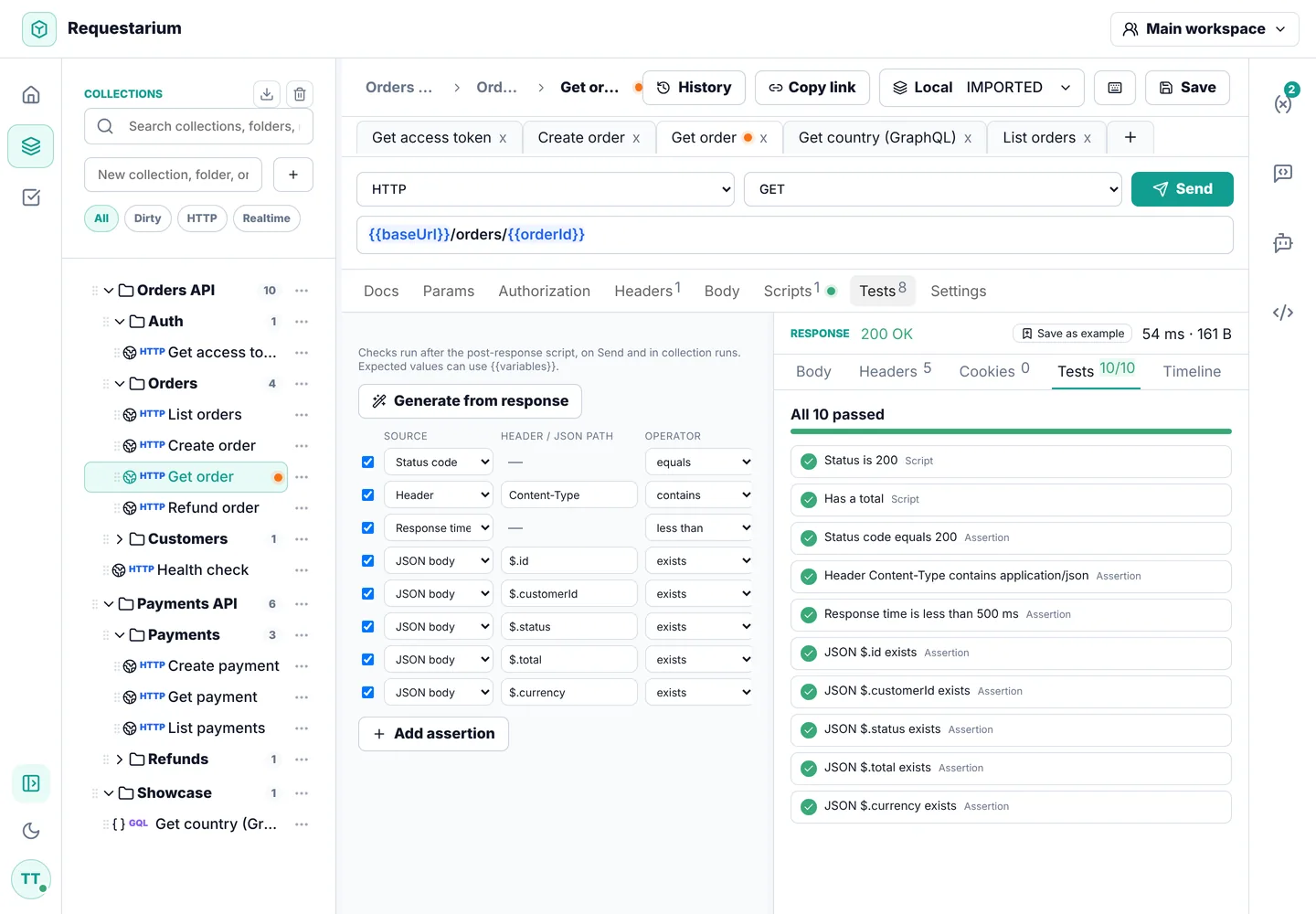
Not everyone who tests an API wants to write JavaScript. And even people who do don't want to write pm.expect(pm.response.code).to.equal(200) for the four-hundredth time. Most checks are simple enough to be a row in a table: this part of the response, this comparison, this value.
That's what the Tests tab on a request is for.
One row per check
Each assertion picks a source, an operator and an expected value:
| What you want | Source | Path | Operator | Expected |
|---|---|---|---|---|
| The request succeeds | Status code | equals | 200 | |
| JSON comes back | Header | Content-Type | contains | json |
| The invoice has an id | JSON body | $.id | exists | |
| The first item is a book | JSON body | $.items[0].type | equals | book |
| The id has the right prefix | JSON body | $.id | matches regex | ^inv_ |
| The total is a number | JSON body | $.total | is type | number |
| It is fast enough | Response time (ms) | less than | 800 | |
| It isn't huge | Size (bytes) | at most | 50000 |
Sources: status code, a header, the body text, a JSON path, response time in milliseconds and size in bytes.
Operators: equals, does not equal, contains, does not contain, exists, does not exist, less than, at most, greater than, at least, matches regex, is type (string, number, boolean, array, object, null) and matches JSON schema.
JSON paths look like $.a.b, a.b, $.items[0], $['odd key'] or $.items.length. Expected values can use {{variables}}, including ones the post-response script just set.
See results before you save
The Last response column shows each check against the response you last got, so you know immediately whether the assertion is right. Generate from response adds starter checks from that response: its status code, its content type, a response-time budget and its top-level JSON fields. Delete what you don't need and tighten the rest.
Validate the shape with JSON Schema
Checking fields one by one gets tedious for large responses. Use matches JSON schema on the path $ instead:
{
  "type": "object",
  "required": ["id", "status", "items"],
  "properties": {
    "id": { "type": "string", "pattern": "^ord_" },
    "status": { "enum": ["open", "paid", "cancelled"] },
    "items": {
      "type": "array",
      "minItems": 1,
      "items": {
        "type": "object",
        "required": ["sku", "qty"],
        "properties": { "qty": { "type": "number", "minimum": 1 } }
      }
    }
  }
}
Supported keywords include type, required, properties, items, enum, const, minimum and maximum values, lengths and pattern. That covers most contract checks: a field was renamed, a type changed, an enum gained a value nobody told the frontend about.
Rules for the whole API, set once
A collection or folder has a Tests tab too. Its assertions apply to every HTTP and GraphQL request inside it, including subfolders. Good candidates:
- Status code is less than
500. - Response time is less than
1000. - Header
Content-Typecontainsjson.
Inherited assertions run first (the collection's, then each folder's from the top down), then the request's own. A request's Tests tab lists the inherited ones read-only, with where each comes from and its result against the last response.
Where they run
Assertions run after the post-response script, on every Send, in the collection runner and in the CLI. A failed assertion fails the request in a collection run and shows up in JUnit and HTML reports, exactly like a pm.test. Results from scripts and from the Tests tab appear in the same list, failures first, with expected and actual values.
requestarium run-collection "Orders API" --env Staging --junit results.xml