Will my Postman scripts still work? A pm API compatibility guide

The biggest worry when leaving Postman isn't the requests. It's the scripts: years of pre-request logic and tests that nobody wants to rewrite. The good news is that most of them run as they are. This post lists what works, what is converted for you, and what doesn't have a counterpart yet.
What runs unchanged
Requestarium's script runtime exposes the same pm object Postman uses (and a cm alias). These are the calls most collections rely on, and they work without changes:
| Area | Calls |
|---|---|
| Tests | pm.test(name, fn), pm.expect(value) with .to.equal, .to.include, .to.be.within |
| Response | pm.response.code, pm.response.json(), pm.response.text() |
| Request | pm.request.headers.get/set/remove, pm.request.url, pm.request.body.raw |
| Variables | pm.environment.get/set/unset, pm.variables.get, pm.variables.replaceIn, pm.globals.get/set |
| Cookies | pm.cookies and the cookie jar |
| Libraries | require('crypto-js'), require('moment'), require('uuid') |
Postman dynamic variables work in requests too: {{$guid}}, {{$timestamp}}, {{$randomUUID}} and friends.
A typical login-and-chain script needs no edits:
pm.test('logged in', () => {
  pm.expect(pm.response.code).to.equal(200);
});
pm.environment.set('token', pm.response.json().token);
During a collection run, values set with pm.environment.set are passed to the requests after it in the same iteration, so the next request can use {{token}}.
What is converted on import
Older collections often use the legacy Postman API from before pm existed. The import rewrites these to pm automatically:
| Legacy | Converted to |
|---|---|
postman.setEnvironmentVariable('x', v) and the other legacy variable calls | pm.environment.set('x', v) and friends |
JSON.parse(responseBody) | pm.response.json() |
responseBody | pm.response.text() |
responseCode.code | pm.response.code |
responseHeaders['Content-Type'] | pm.response.headers.get('Content-Type') |
One-line tests["status is 200"] = responseCode.code === 200; | A pm.test |
Other uses of tests, environment and globals run through a small compatibility layer. pm.collectionVariables works during a run, but values set with it are not saved.
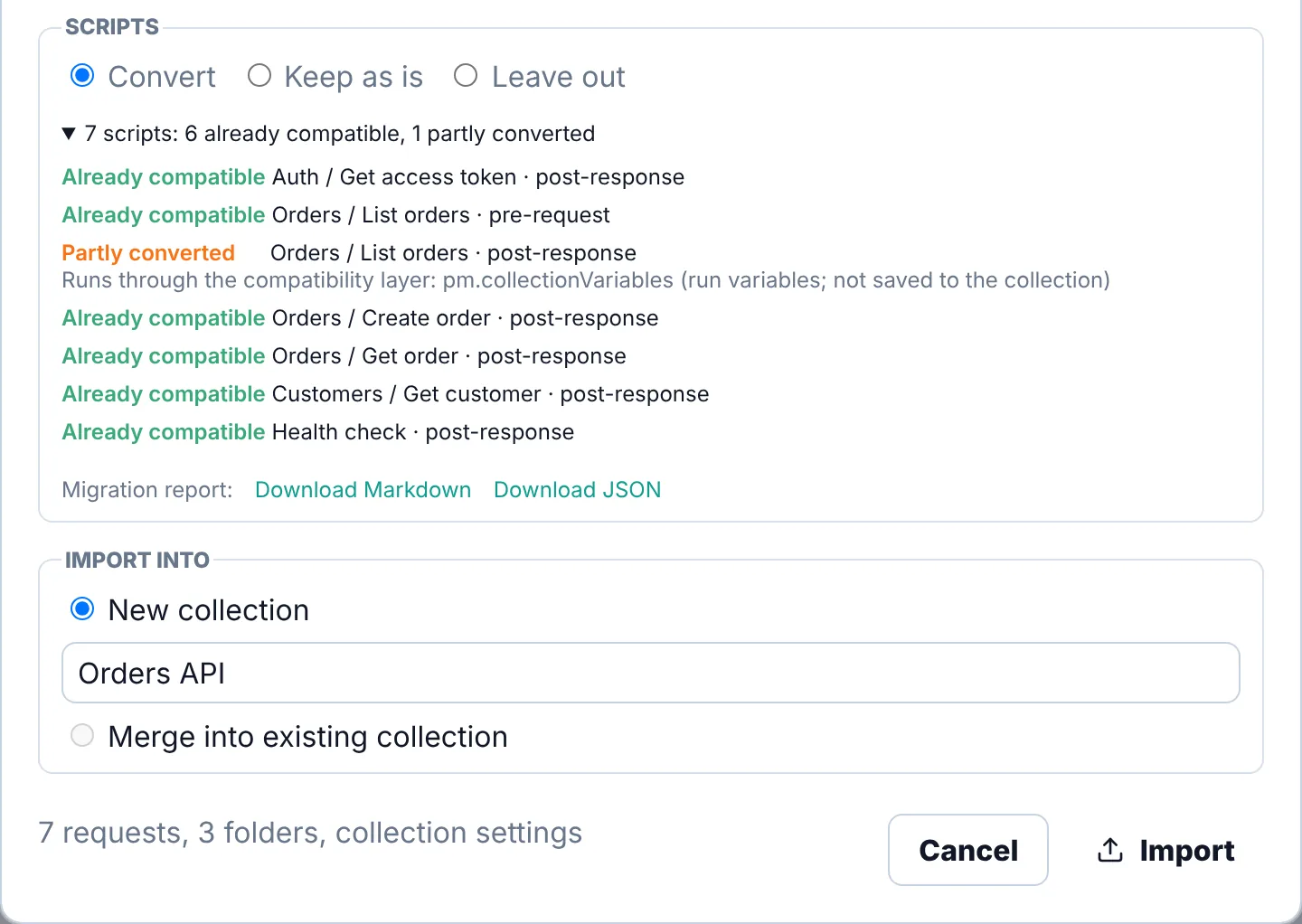
Every converted script keeps its original as a comment at the end, and the import preview shows, per script, what was converted, what runs through the compatibility layer and what won't work. You can download that report as Markdown or JSON.
What doesn't have a counterpart yet
| Postman | Workaround |
|---|---|
pm.sendRequest | Make the call a separate request earlier in the folder, and pass the value on with pm.environment.set |
postman.setNextRequest | Arrange requests in the order they should run; use folders and --folder to run a subset |
pm.visualizer | Look at the response body in the app, or the --html report from the CLI |
pm.vault | Secret environment variables, a local .env file, or a cloud secret manager |
| Response time in tests | --max-p95 in the CLI gates the whole run on its 95th percentile |
How to check your own collection
You don't need to guess. Import the collection, and before anything is created, the preview's Scripts section lists every script that is only partly converted. From a terminal:
requestarium import ./my.postman_collection.json --preview --script-report scripts.md--preview creates nothing, and scripts.md lists every script with what was converted and what won't run. Then run the collection once:
requestarium run-collection "My API" --env Staging --verbose--verbose prints script console output, so a failing line is easy to find.