Moving your team off Postman without losing a week

Most teams don't leave Postman because of one big problem. They leave because of many small ones: seat prices that grow faster than the team, collections that live in someone's personal workspace, and a desktop app that feels heavier every release.
If you are a team of 2 to 15 people, switching takes an afternoon, not a week. This guide walks through it with a real collection, step by step.
Step 1: Take stock before you export
Open Postman and write down what your team actually uses. For most teams the list is short:
- a handful of collections that matter, and many that nobody opened this year;
- one environment per stage (local, staging, production);
- pre-request and test scripts on some requests;
- a few people who need edit access, and some who only run requests.
Archive what nobody uses. A migration is the cheapest moment to clean up.
Step 2: Migrate the whole workspace at once
The fastest way is the Postman API:
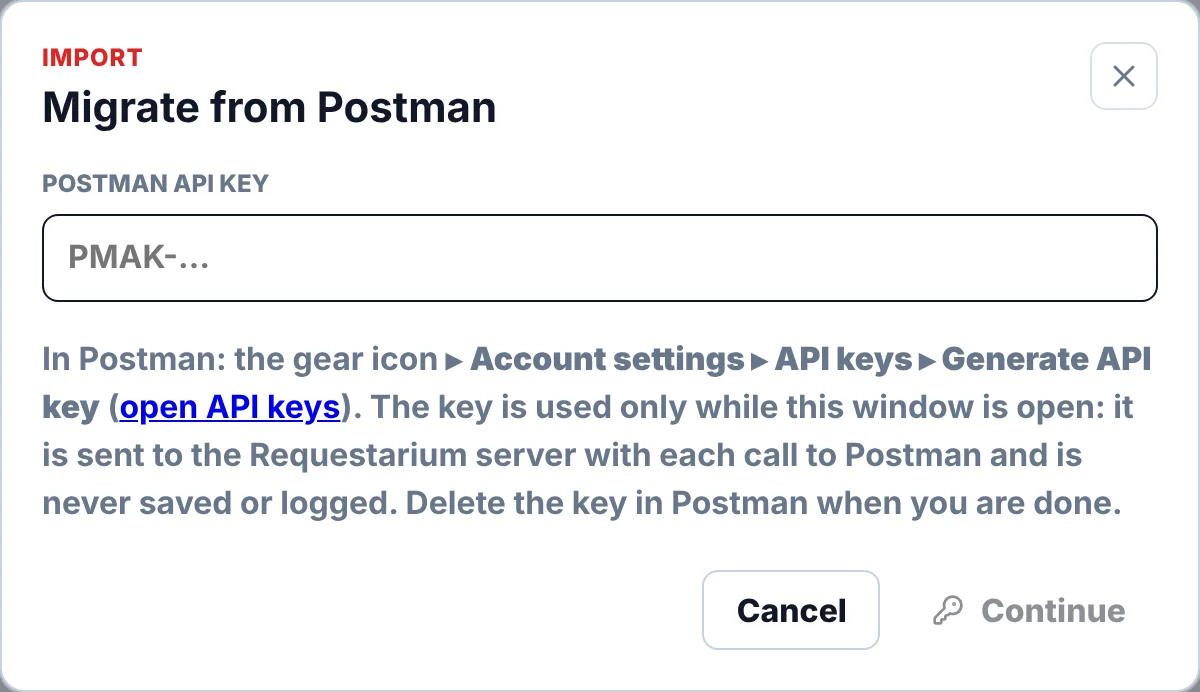
- In Postman, open Account settings → API keys and generate a key.
- In Requestarium, click the Import icon at the top of the Collections sidebar and choose Migrate from Postman….
- Paste the key, pick the Postman workspace and tick the collections and environments to bring over.
Step 3: Or import exported files
Prefer not to use an API key? Export each collection from Postman as Collection v2.1 (v2.0 works too), then choose Import file… in the same menu.
Either way, every collection opens in a preview first. You see the folder tree with checkboxes, so you can leave out requests nobody needs:
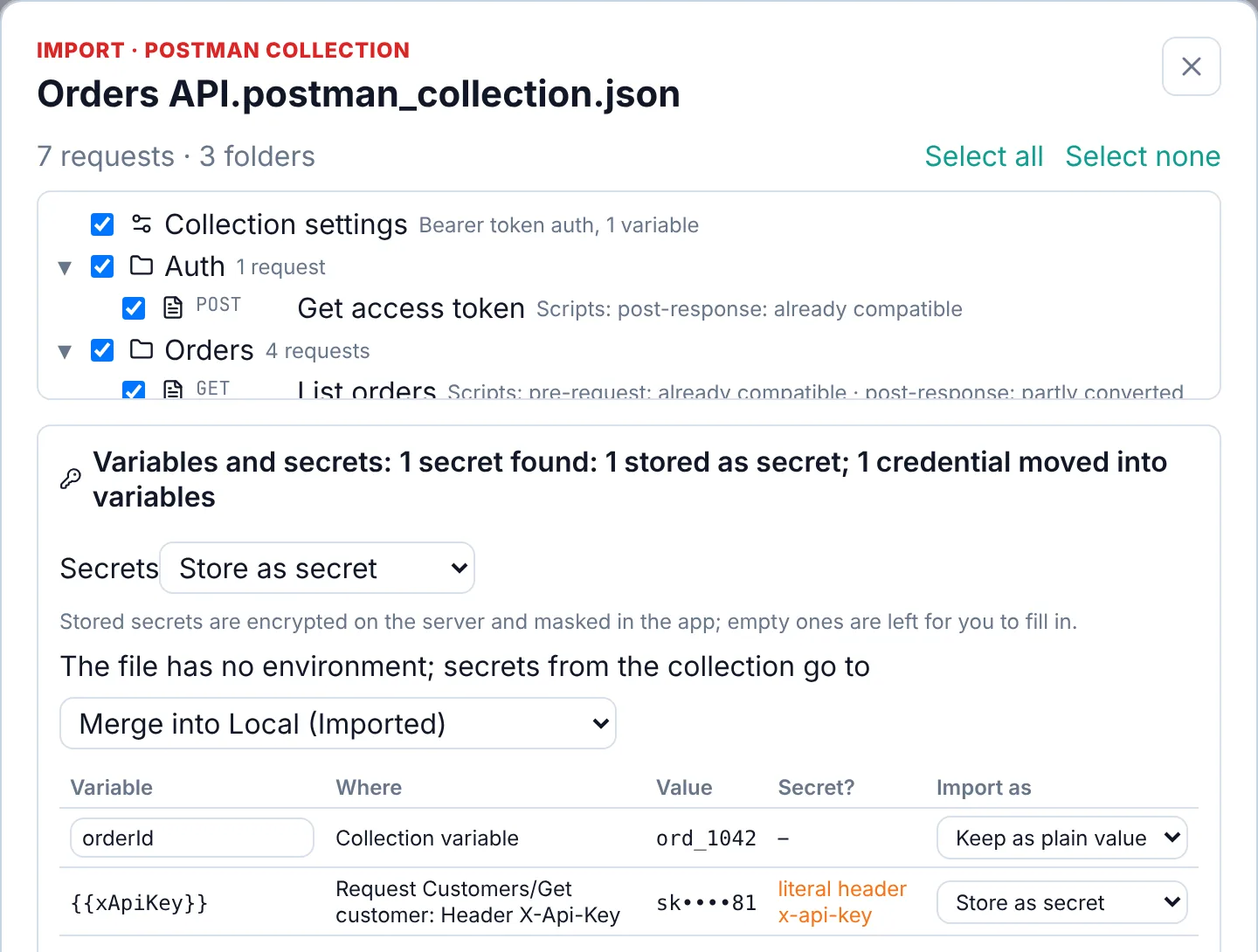
Notice the Variables and secrets step. Requestarium spotted an API key typed straight into a header (X-Api-Key), moved it into a {{xApiKey}} variable and will store it as an encrypted secret. Your teammates get the request, not your key.
What comes over: folders, requests, headers, query parameters, raw, form and GraphQL bodies, bearer, basic and API key auth, collection and folder variables, and pre-request and test scripts. Anything that can't be carried over, such as file uploads, is listed after the import, so nothing disappears silently.
The CLI does the same, and --dry-run tells you up front what it will create:
npm install -g @requestarium/cli
requestarium login
requestarium import ./orders-api.postman_collection.json --dry-run
requestarium import ./orders-api.postman_collection.json
Step 4: Check your scripts
Requestarium runs the pm.* script API and Postman dynamic variables such as {{$guid}} and {{$randomUUID}}. Tests written with pm.test and pm.expect run without changes.
The Scripts section of the preview tells you exactly what happens to each script before you import:
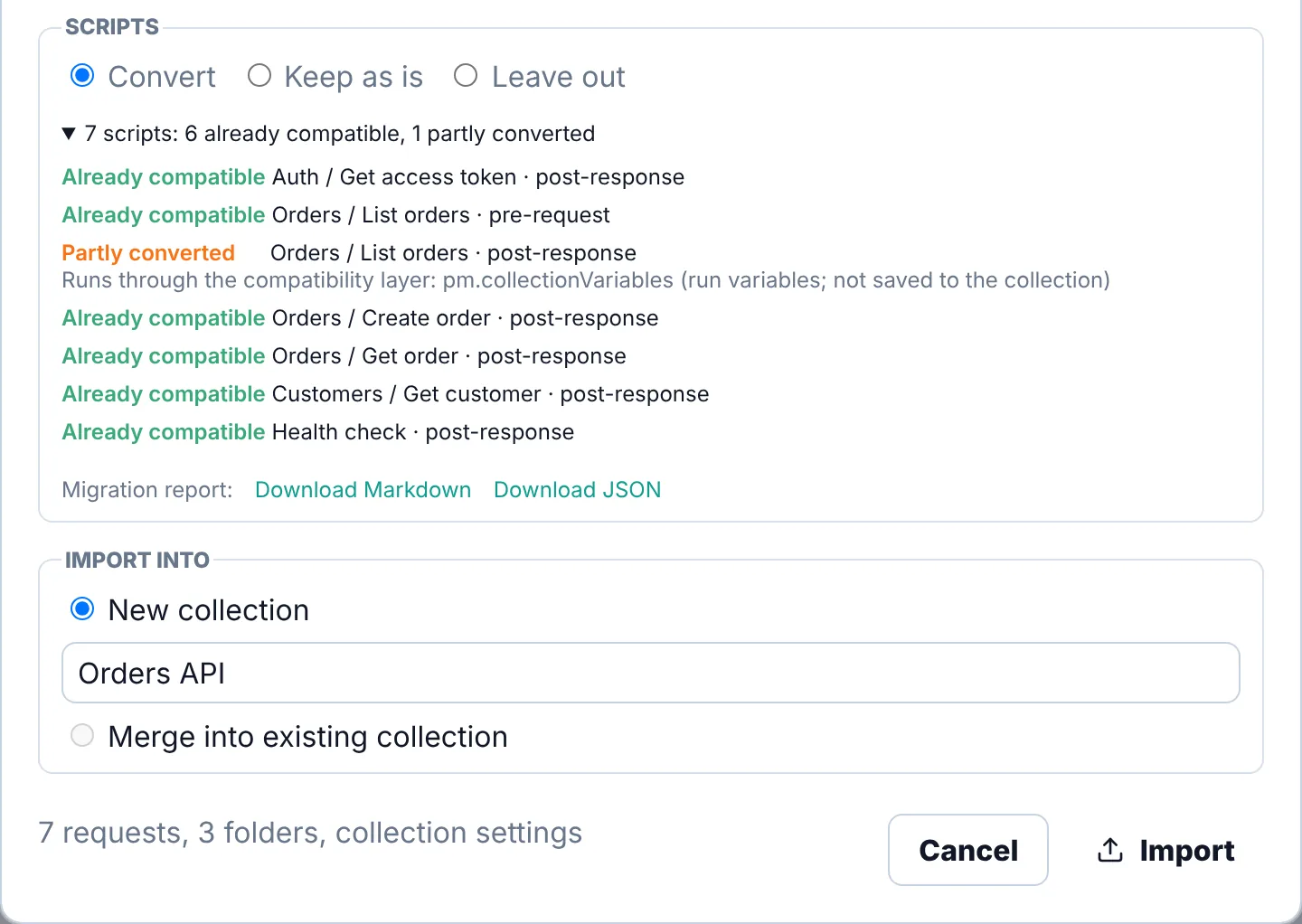
Here six scripts are already compatible. One uses pm.collectionVariables, which works, with a note that values it sets live for the run instead of being saved to the collection. Download Markdown gives you the full report to share with the team.
After the import, scripts sit in the request's Scripts tab, exactly as you wrote them:
pm.test("Status is 200", () => pm.response.to.have.status(200));
pm.test("Returns orders", () => {
  const body = pm.response.json();
  pm.expect(body.data).to.be.an("array").that.is.not.empty;
  pm.collectionVariables.set("orderId", body.data[0].id);
});
Step 5: Check your environments
Migrate from Postman… brings environments too, into a group named "Postman: workspace name". Secret variables stay secret. Requestarium has no globals, so Postman globals are copied into each migrated environment, and the environment's own value wins.
If you imported files instead, import each exported environment file the same way, or from the CLI:
requestarium import ./staging.postman_environment.json --environments-only --name Orders
requestarium env create Staging --var baseUrl=https://staging.example.com --secret-var API_KEYStep 6: Send a request
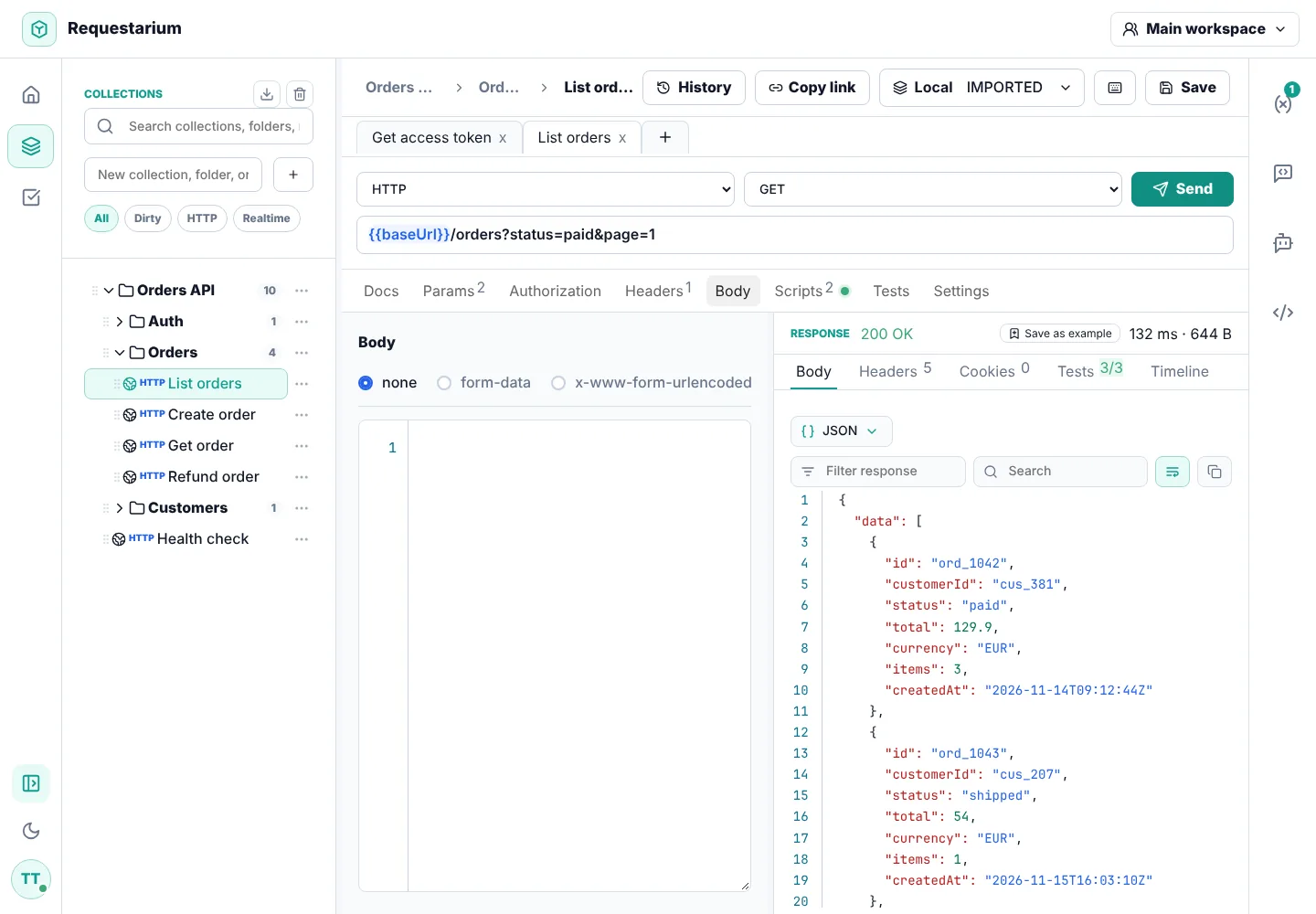
Pick an environment in the top bar, open a request and click Send. Variables such as {{baseUrl}} resolve against the environment, and your test results show up next to the response:
Step 7: Run the whole collection
Open the collection's Runs tab and click Run collection. Every request runs in order with its scripts, and values set by one request (like an access token) are passed to the next:
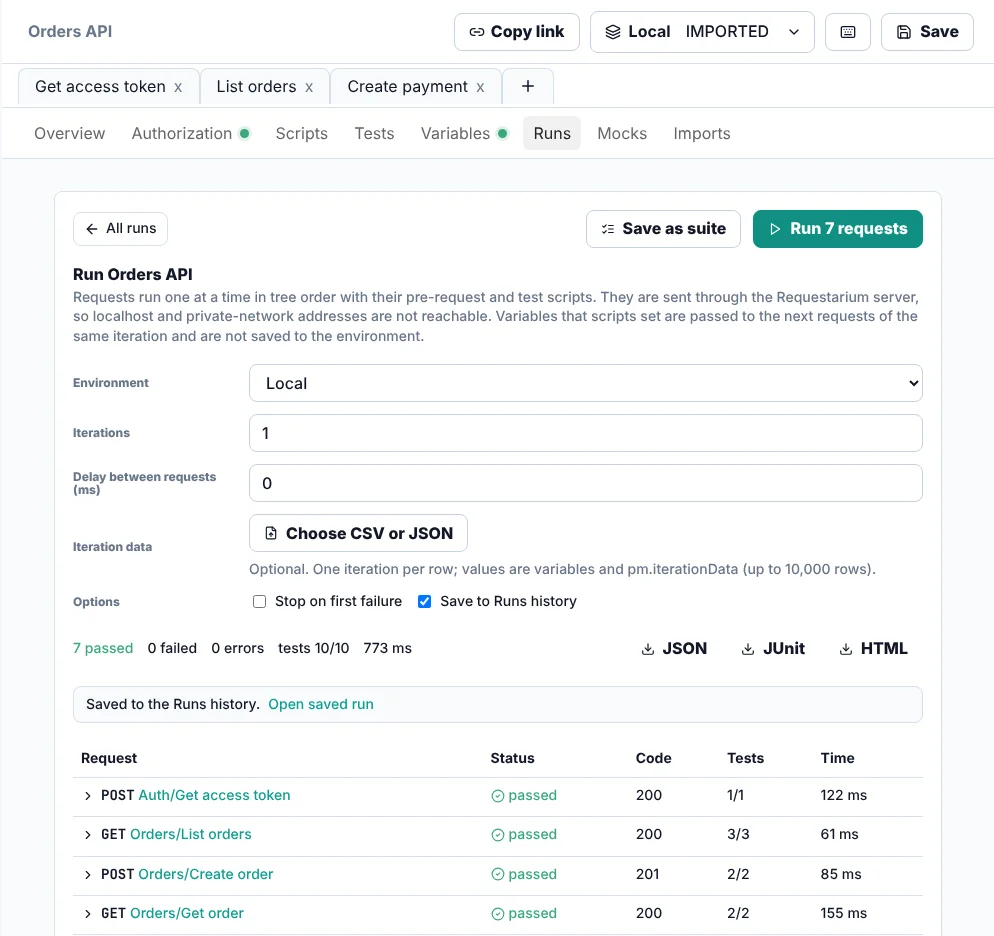
Green tests mean the migration worked. The same run from a terminal:
requestarium run-collection "Orders API" --env Staging✓ Orders API/Auth/Get access token POST https://staging.example.com/auth/token 200 · 141 ms
✓ Status is 200
✓ Orders API/Orders/List orders GET https://staging.example.com/orders?status=paid&page=1 200 · 105 ms
✓ Status is 200
✓ Returns orders
✓ Responds in under 500 ms
…
✓ Orders API: 7/7 requests passed, 0 failed, 0 errors · tests 10/10 passed · 780 ms · environment: StagingAdd that command to CI and your API tests run on every pull request, without a Postman seat for the build server. How to run API tests in GitHub Actions has a ready workflow.
Step 8: Invite the team
Move the imported collections to a team workspace, and your teammates get them together with their environments. The Free plan covers up to 3 people, which is enough to try the whole flow with real work before anyone pays.
What it costs
Requestarium Pro is $8 per month billed yearly, and Team is $12 per seat per month billed yearly. See pricing for the details, or read how we compare in Postman alternative.
Questions about a migration? Get in touch and we will help you move your first collection.