Turn a HAR file from your browser into an API collection

Sometimes the fastest way to understand an API is to watch a web app use it. Open DevTools, click through the flow, and every call the frontend makes is right there in the Network tab. The trouble is turning that into something you can send again, edit and share. A HAR file does exactly that.
HAR (HTTP Archive) is a JSON format every major browser can export. It records each request and response from a page session. Requestarium imports it as a collection, keeping only the API calls.
Step 1: Record the session
- Open DevTools (F12, or Cmd+Option+I on a Mac) and go to the Network tab.
- Tick Preserve log so a page navigation doesn't clear the list.
- Optionally filter to Fetch/XHR to see only API calls while you work.
- Use the app: log in, open the page, submit the form, whatever flow you want to capture.
- Right-click the request list and save it as HAR. Chrome calls it Save all as HAR with content; Firefox has Save All As HAR.
Step 2: Import it
In Requestarium, use Import → Import file… in the Collections sidebar and pick the .har file. The import does the cleanup for you:
- API calls only. Images, scripts, stylesheets, fonts and
OPTIONSpre-flight requests are dropped. - No duplicates. A call with the same method, URL and body appears once, even if the app made it ten times. Tick Keep repeated calls if you want every one.
- Organized. Requests are grouped into a folder per URL path, and per host when the session talked to several.
- Responses are not imported. You get the requests, ready to send again.
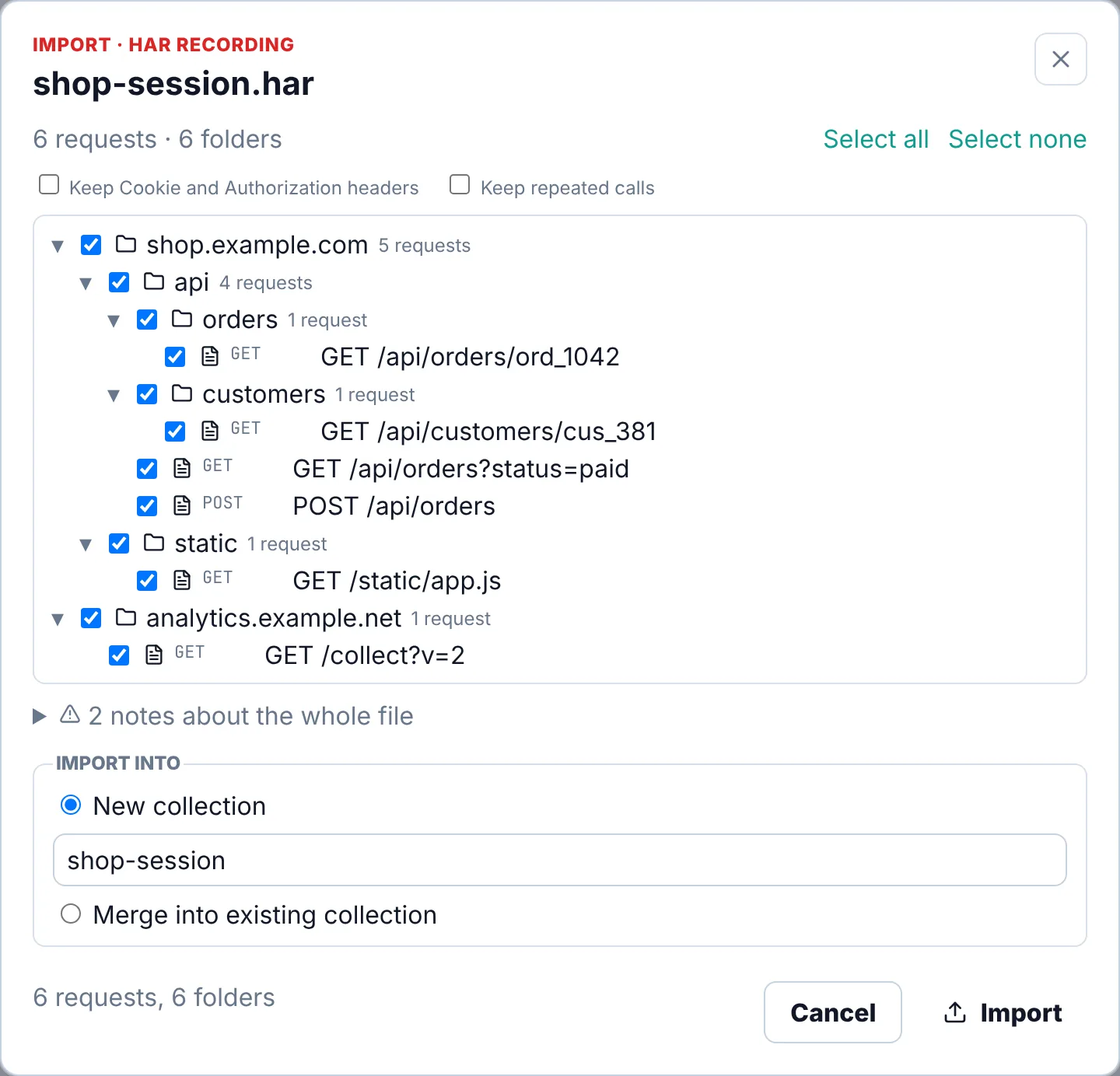
From a terminal, the same import:
requestarium import ./checkout-session.har --dry-run
requestarium import ./checkout-session.har --name "Checkout (recorded)"
Credentials are stripped by default
A HAR file is a full recording, and it includes your session cookies and Authorization headers. Importing those into a shared workspace would hand your login to everyone who can see the collection.
So by default the import leaves out Cookie and Authorization headers. If you really need them, tick Keep Cookie and Authorization headers in the preview, or pass --har-keep-credentials in the CLI. A better habit is to replace them with a variable:
Authorization: Bearer {{token}}and keep the token in an environment's secret variable or a local .env file. See Keeping API keys out of your collections.
Step 3: Make it reusable
A recording gives you literal values. A few minutes of cleanup turns it into a collection your team can use:
- Replace the host with
{{baseUrl}}so the same requests work on local, staging and production environments. - Replace IDs that change with variables, and set them from earlier responses in a post-response script:
pm.environment.set('orderId', pm.response.json().id);- Add a
pm.testto the important calls, so the collection doubles as a test. - Rename requests from URL paths to what they do: "Create order", "Apply coupon".
When to use HAR, and when not
HAR import is ideal for reverse-engineering an undocumented internal API, reproducing a bug report exactly as the browser sent it, or bootstrapping a collection for an app that has no spec. If the API has an OpenAPI document, import the spec instead: you get every operation, not just the ones you clicked. For a single call, Copy as cURL and a paste is quicker; see Turn curl commands into a reusable collection.
Requestarium can also export a collection as HAR (Export as…, HAR), which is handy when another tool or a performance testing setup expects one.