How to run API tests in GitHub Actions

Most teams already have API tests. They live in a collection someone runs by hand before a release, which means they run when someone remembers. Moving those same tests into CI turns them into a gate: a pull request that breaks POST /orders goes red before it is merged, not after a customer finds it.
This guide sets that up in GitHub Actions with the Requestarium CLI. It runs the collections you already have, with the same engine as the app's Send button, so there is no second test suite to maintain.
Step 1: What you need
- A collection with a few requests and some
pm.testchecks. If your tests are in Postman or Insomnia today, import them first;pm.*scripts run as they are. - An environment for the stage you test against, such as
Staging. - An API token for CI. Create one in Settings → API tokens in the app: give it a name such as "GitHub Actions" and pick how long it lives. Tokens start with
trt_.
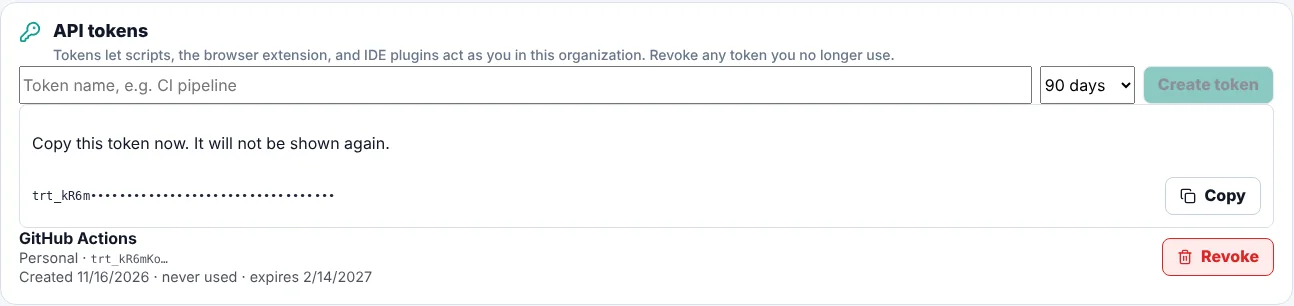
Add the token to your repository as a secret named REQUESTARIUM_TOKEN (Settings → Secrets and variables → Actions). Do the same for any API key your requests need, for example STAGING_API_KEY.
Step 2: Try it locally first
Before writing YAML, check that the run works from your machine:
npm install -g @requestarium/cli
requestarium login
requestarium run-collection "Orders API" --env Staging✓ Orders API/Auth/Get access token POST https://staging.example.com/auth/token 200 · 141 ms
✓ Status is 200
✓ Orders API/Orders/List orders GET https://staging.example.com/orders?status=paid&page=1 200 · 105 ms
✓ Status is 200
✓ Returns orders
✓ Responds in under 500 ms
✓ Orders API/Orders/Create order POST https://staging.example.com/orders 201 · 96 ms
✓ Order created
✓ Order is pending
…
✓ Orders API: 7/7 requests passed, 0 failed, 0 errors · tests 10/10 passed · 780 ms · environment: StagingThe command exits with code 1 when a request fails, errors or has a failed test. That exit code is all CI needs.
Step 3: Add the workflow
Save this as .github/workflows/api-tests.yml:
name: API tests
on: [push, pull_request]

jobs:
  api-tests:
    runs-on: ubuntu-latest
    steps:
      - uses: actions/setup-node@v4
        with:
          node-version: 22
      - run: npm install -g @requestarium/cli
      - name: Run the Orders API collection
        env:
          REQUESTARIUM_TOKEN: ${{ secrets.REQUESTARIUM_TOKEN }}
          API_KEY: ${{ secrets.STAGING_API_KEY }}
        run: |
          requestarium run-collection "Orders API" --env Staging --env-var API_KEY \
            --junit results.xml --html report.html --save-run
      - uses: actions/upload-artifact@v4
        if: always()
        with:
          name: api-report
          path: |
            results.xml
            report.html
A few things are worth pointing out:
- No login step. With
REQUESTARIUM_TOKENset, the CLI uses the token directly. --env-var API_KEYreads theAPI_KEYvariable from the job's environment and makes it available as{{API_KEY}}in your requests. The value never has to be saved anywhere else, and it is masked in every report. If the variable is missing, the run stops instead of sending a request without it.--junit results.xmlwrites a standard JUnit report: one test suite per request, one test case perpm.test. Any test-report action can read it.--html report.htmlwrites a self-contained report you can open from the workflow's artifacts. Failed requests start expanded, with their response.--save-runstores the result in the collection's run history in Requestarium, together with the branch, the commit and a link to the workflow run.
Step 4: Open a pull request
Inside GitHub Actions the CLI writes a table of results to the job summary and marks each failed request with an error annotation, so the failure is visible on the pull request without opening logs. Here is what the log of a failing run looks like:
✗ Orders API/Orders/Create order  POST https://staging.example.com/orders  500 · 92 ms
    ✗ Order created — Expected status 201, got 500 Internal Server Error.
    ✗ Order is pending — Expected undefined to deeply equal pending.
…
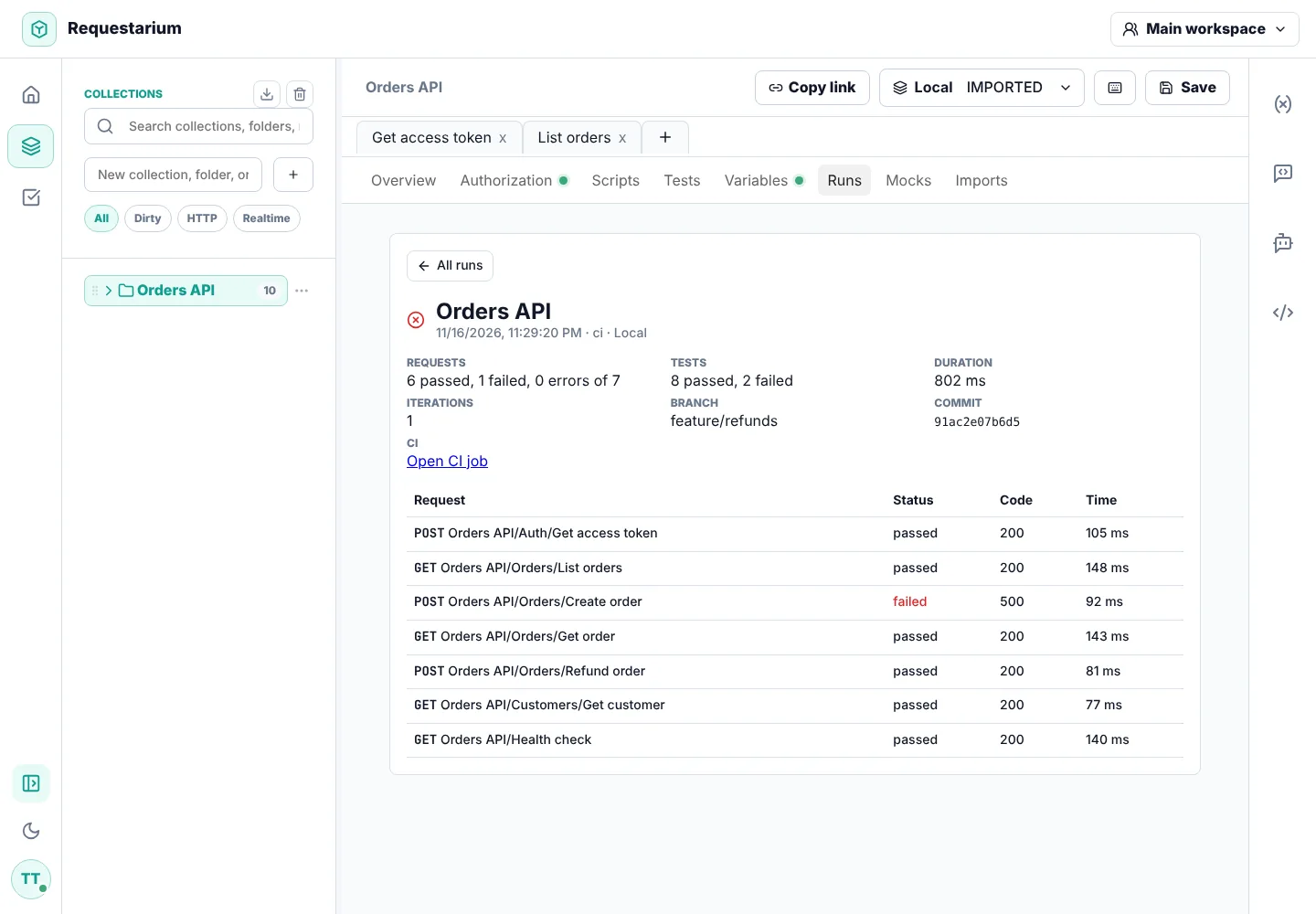
✗ Orders API: 6/7 requests passed, 1 failed, 0 errors · tests 8/10 passed · 802 ms · environment: Staging
Saved to the run history (run 202fc5d4-7c81-4e7b-a434-f8d3dd20a0fc).
The job fails, and the pull request shows an annotation on Create order. Add --no-github if you'd rather not have annotations.
Step 5: Find the run in Requestarium
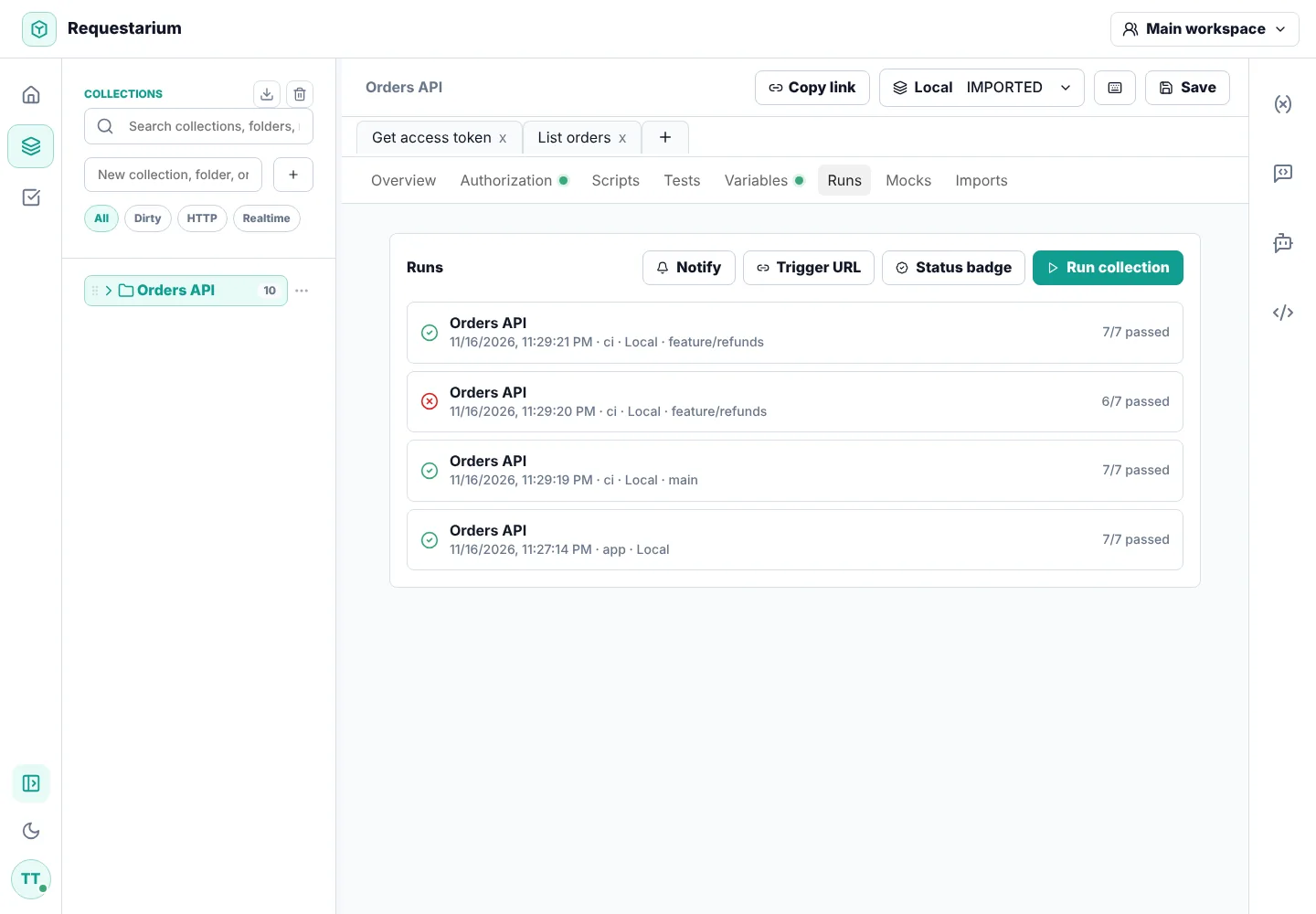
Because of --save-run, every CI run appears in the collection's Runs tab next to the runs you start from the app, with the branch it ran on:
Open a run to see which request failed, the commit, and a link back to the GitHub job:
requestarium runs "Orders API" prints the same list in a terminal:
✓ 2026-11-16 23:29:21  Orders API  7/7 passed  ci feature/refunds@4be0f13  env Staging  https://github.com/acme/shop-api/actions/runs/11902
✗ 2026-11-16 23:29:20  Orders API  6/7 passed  ci feature/refunds@91ac2e0  env Staging  https://github.com/acme/shop-api/actions/runs/11891
✓ 2026-11-16 23:29:19  Orders API  7/7 passed  ci main@d187326  env Staging  https://github.com/acme/shop-api/actions/runs/11873
Make it fit your pipeline
Smoke tests only. Run one folder instead of the whole collection, and stop at the first failure:
requestarium run-collection "Orders API" --folder Smoke --env Staging --bailFlaky staging. Retry requests that hit a 502, 503 or 504, and fail the job only when the pass rate drops:
requestarium run-collection "Orders API" --env Staging --retries 2 --min-pass-rate 95Performance budget. Fail when the 95th percentile response time is too high:
requestarium run-collection "Orders API" --env Staging --max-p95 800Nightly runs. Add a schedule trigger to the same workflow:
on:
  schedule:
    - cron: '0 3 * * *'
  workflow_dispatch:
Many inputs. Run the collection once per row of a CSV file with --data users.csv. See Data-driven API tests with CSV and JSON files.
Secrets in a cloud vault. If your keys live in AWS Secrets Manager, Azure Key Vault or Google Cloud Secret Manager, the CLI can read them directly, so nothing is copied into GitHub. See Keeping API keys out of your collections.
Not on GitHub?
The CLI works in any CI that runs Node.js 20.10 or later. GitLab CI reads the same JUnit file and shows results on the merge request. Run history also records the branch, commit and job link for GitLab CI, CircleCI, Jenkins, Azure Pipelines and Bitbucket Pipelines. The CLI reference has the examples.
Cost
The CLI is free on every plan, and running requests is never limited. The Free plan's limits on collections and environments apply the same way as in the app. See pricing.